|
|
Equation
Editor Tips & Tricks |
|
| Советы
и Уловки Редактора Equation |
|
|
|
|
|
|
|
|
|
|
Here's another tip
involving the use of matrices. |
|
Вот - другой
пример использования
матриц. |
|
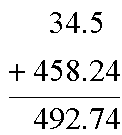
The goal here is
to create a simple arithmetic problem: |
|
Цель его состоит в
создании простой
арифметической задачи: |
|
 |
|
Here's the steps used
to create this:
|
|
Рекомендуемые
шаги: |
|
|
|
|
|
Insert a 3-row,
1-column matrix with a solid partition line
between the 2nd and 3rd rows (See
Tip
#13 for more details). Make sure you use
decimal point column alignment.
|
1 |
Вставьте матрицу с
3-мя строками и одним
столбцом со сплошной
линией раздела между 2-ой и 3-ей
строками (Детали см. Совет
13).
Проверьте, что Вы
выровняли позицию
десятичной точки. |
|
Type 34.5 into the
top row, +458.24 into the middle row, and
492.74 into the bottom row.
|
2 |
Напечатайте 34.5 в
верхней строке, +458.24 - в
средней, а 492.74 - в нижней
строке. |
Now notice that the
plus sign is too close to the number. We can
fix this by adding a little space. Place the
insertion point between them and insert a
thick space (use Ctrl+Shift+Space on Windows,
Cmd+Shift+Space on the Macintosh, or choose  from the 2nd symbol palette menu).
 |
3 |
Теперь заметьте, что
знак "плюс" слишком
близок к числу. Мы можем
добавить небольшой
пропуск. Разместите
курсор вставки между
объектами и вставьте
широкий пробел (используйте
Ctrl+Shift+ Space в Windows, Cmd+Shift+Space
в Макинтоше, или выберите
из 2-го меню палитры
символов. |
|
|
|
|
|
With MathType, you can
save this whole construct on the toolbar. |
|
В MathType Вы можете
сохранить всю эту
конструкцию прямо на
панели инструментов. |
|
That
way, you can just click on it to insert the
addition problem and then just change the
numbers for the specific instance. |
|
Таким образом,
Вам останется лишь
щёлкнуть по клавише с
конструкцией, чтобы
вставить задачу сложения
чисел, а затем - изменить
числа на нужные. |
|
Click
here to find out more about MathType. |
|
Щёлкните
здесь, чтобы
больше узнать о MathType. |
|
|
|
|
|
|
|
|
Copyright © 2000-2002 by Design
Science, Inc. All rights reserved. |




